Inputs with Compatible Sizes
2-D Inputs
These are some combinations of scalars, vectors, and matrices that have compatible sizes:
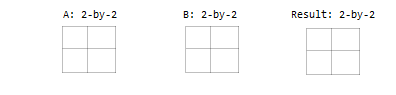
Two inputs which are exactly the same size.
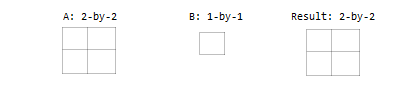
One input is a scalar.
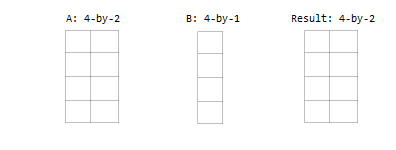
One input is a matrix, and the other is a column vector with the same number of rows.
One input is a column vector, and the other is a row vector.
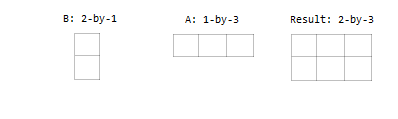
Multidimensional Arrays
Every array in MATLAB has trailing dimensions of size 1. For multidimensional arrays, this means that a 3-by-4 matrix is the same as a matrix of size 3-by-4-by-1-by-1-by-1. Examples of multidimensional arrays with compatible sizes are:
One input is a matrix, and the other is a 3-D array with the same number of rows and columns.
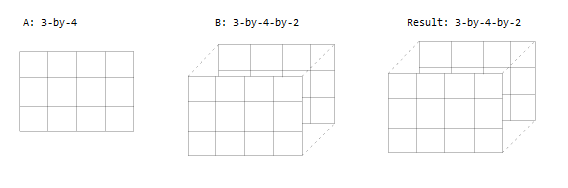
One input is a matrix, and the other is a 3-D array. The dimensions are all either the same or one of them is 1.
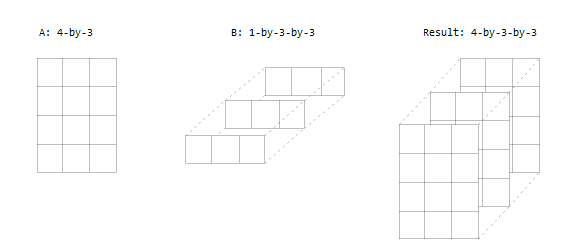
Empty Arrays
The rules are the same for empty arrays or arrays that have a dimension size of zero. The size of the dimension that is not equal to 1 determines the size of the output. This means that dimensions with a size of zero must be paired with a dimension of size 1 or 0 in the other array, and that the output has a dimension size of 0.
     A: 1-by-0
     B: 3-by-1
Result: 3-by-0
Inputs with Incompatible Sizes
Incompatible inputs have sizes that cannot be implicitly expanded to be the same size. For example:
One of the dimension sizes are not equal, and neither is 1.
A: 3-by-2
B: 4-by-2
Two nonscalar row vectors with lengths that are not the same.
A: 1-by-3
B: 1-by-4
Examples
Subtract Vector from Matrix
To simplify vector-matrix operations, use implicit expansion with dimensional functions such as sum, mean, min, and others.
For example, calculate the mean value of each column in a matrix, then subtract the mean value from each element.
A = magic(3)
A =

     8     1     6
     3     5     7
     4     9     2
C = mean(A)
C =

     5     5     5
A - C
ans =

     3    -4     1
    -2     0     2
    -1     4    -3
Add Row and Column Vector
Row and column vectors have compatible sizes, and when you perform an operation on them the result is a matrix.
For example, add a row and column vector. The result is the same as bsxfun(@plus,a,b).
a = [1 2 3 4]
ans =

     1     2     3     4
b = [5; 6; 7]
ans =

     5
     6
     7
a + b
ans =

     6     7     8     9
     7     8     9    10
     8     9    10    11
plot(sample,v1,"ro-","LineWidth",4)
title("Sample Mass")ylabel("Mass (g)")legend("a","b","c")
legend("Exp A","Exp B")

buka file di electicity.mat
buat tahun dari 1991 sd 2013
yrs = (1991:2013)
Comments
Post a Comment